Documentation base URLs use placeholder https://{your-tenant}.sso.id. Log in to show your tenant or custom domain.
Log in for Your Tenant URL
Chapter 4 — Centralized Identity Directory

User Directory, Invitations & Live Session Control

Manage every employee, B2B customer user, and consumer identity from a single command center ( /user-management). Create or invite users, assign Application Roles, inspect login history, verify Tenant Ownership, and remotely revoke compromised browser/mobile sessions in real time.

Incident Response Story: The Stolen Airport Laptop

How CloudPulse Contained a Compromised Executive Session in 8 Seconds

At 6:45 PM on a Friday, CloudPulse's VP of Finance reported that her unlocked laptop was stolen at an airport lounge with active browser sessions open to the billing dashboard.

Instead of rotating tenant-wide signing keys and logging out 40,000 innocent customers, CloudPulse's security engineer opened /user-management, clicked the VP's user profile, opened the Active Sessions tab (GET /api/users/{userId}/sessions), and clicked Revoke All Sessions (DELETE /api/users/{userId}/sessions/revoke-all). Within milliseconds, every refresh token and active session for that user was invalidated across all applications.
1. Onboarding Users: Direct Creation vs. Email Invitations

In /user-management, administrators have two ways to add users manually (alongside automated JIT Federation and SCIM 2.0):

A. Send Email Invitation (POST /api/users/invite)

Enter the user's Email, First Name, Last Name, and pre-assign their Roles/Groups. SSO.ID dispatches a branded invitation email (customizable in /settings → Email Templates) with a one-time cryptographic token so the user sets their own password and MFA. Pending invites can be resent anytime via POST /api/users/{userId}/resend-invite.

B. Direct User Creation (POST /api/users)

Create an active user account immediately with a specified initial password, phone number, and verified status — ideal for automated migration scripts, QA environments, or service desk provisioning.

Flow Diagram User Lifecycle & Active Session Control Flow
flowchart LR ONB["Onboard: Invite / Create / JIT / SCIM"] --> ACT["Active Directory User"] ACT --> ROLES["Assign App Roles, Groups & Orgs"] ROLES --> LOG["User Authenticates -> Tracked Session"] LOG --> MON["Inspect /activity & /sessions"] MON -->|"Compromised Device"| REV["DELETE .../sessions/revoke-all"]
Users onboard via email invite, direct creation, JIT, or SCIM 2.0, then authenticate into tracked sessions that admins can inspect or revoke in real time.
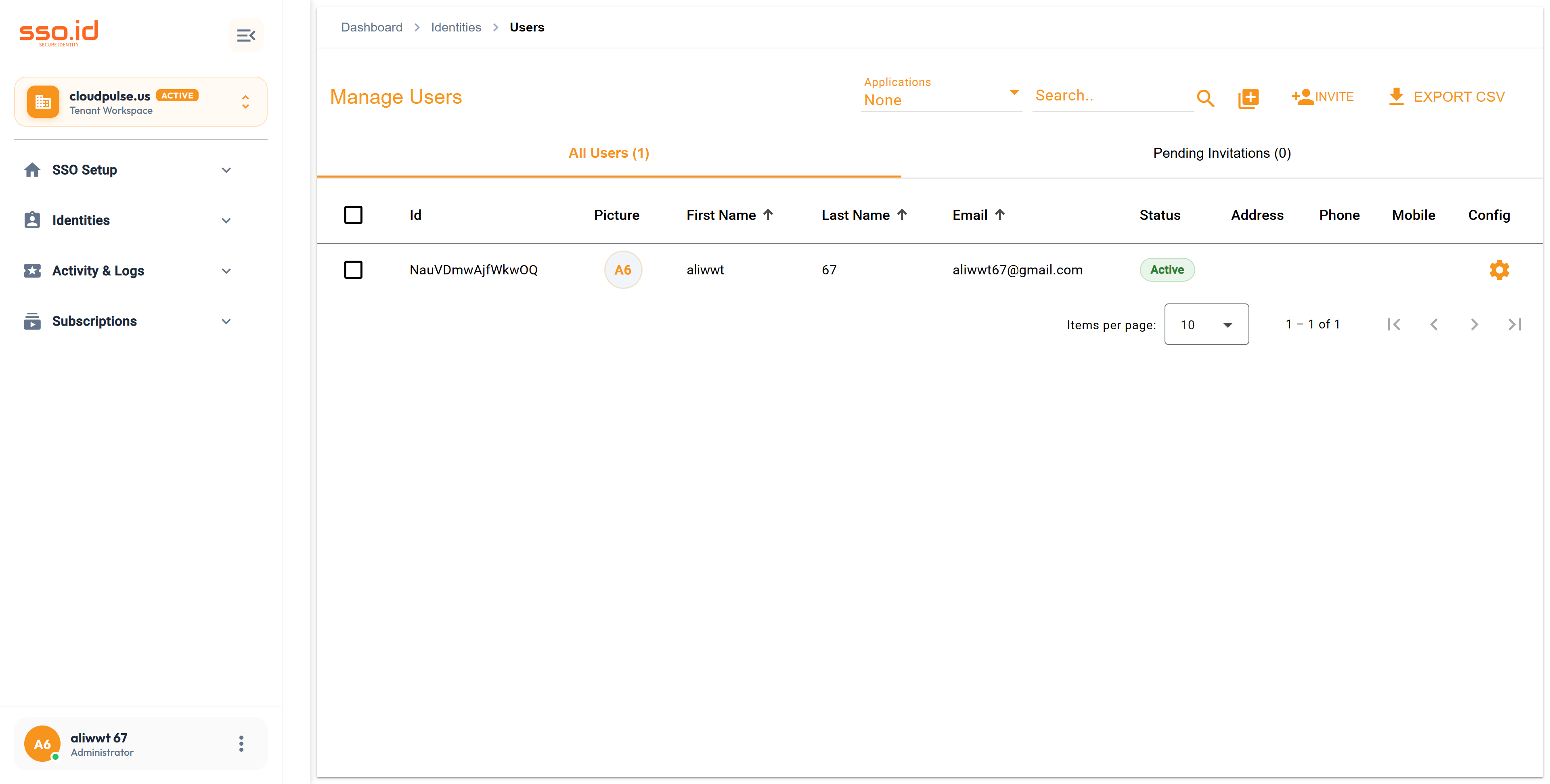
https://cloudpulse.us.beta.sso.id/user-management Click to zoom
User Directory Management console at /user-management with search, invitations, and account lifecycle actions.

2. Assigning Application Roles & Inspecting Effective Access

Opening the User Setting Dialog in /user-management lets you manage the user's complete access graph:

  • Roles Tab (GET / POST / DELETE /api/users/{userId}/roles): Assign or revoke Roles scoped to specific Applications.
  • Groups & Organizations: View which User Groups, B2B Organizations, and Organization Units the user belongs to.
  • Login Activity & Last Login (GET /api/users/{userId}/activity & /last-login): Inspect every historical authentication event, IP address, user-agent, and failure reason for that specific user.

3. Real-Time Device Session Inspection & Revocation

Every interactive login or token refresh creates a tracked session record associated with the user:

  • GET /api/users/{userId}/sessions — Lists every active session with device type, browser, IP address, creation time, and last activity timestamp.
  • DELETE /api/users/{userId}/sessions/{sessionId} — Terminates a single suspicious device session without disturbing the user's other devices.
  • DELETE /api/users/{userId}/sessions/revoke-all — Emergency kill-switch that revokes all active sessions and refresh tokens for the user across the entire tenant.

4. Safe Deletion (Tenant Ownership Check) & Admin GDPR Export

Before deleting a user account (DELETE /api/users/{id}), SSO.ID v2 runs a safety check via GET /api/users/{userId}/tenant-ownership to verify whether the user is the sole owner of any Tenant workspaces, preventing accidental orphaned tenants. Admins can also export a user's complete compliance archive on demand via GET /api/compliance/users/{userId}/export.

5. User Management REST API Reference

Method Endpoint Description
GET / POST https://{your-tenant}.sso.id/api/users Lists directory users (paginated/filtered) or creates a new user directly.
POST https://{your-tenant}.sso.id/api/users/invite Sends an onboarding invitation email (POST /api/users/{userId}/resend-invite resends).
GET / PUT / DELETE https://{your-tenant}.sso.id/api/users/{id} Retrieves, updates, or deletes a specific user record.
GET / POST / DELETE https://{your-tenant}.sso.id/api/users/{userId}/roles Lists, assigns, or removes Roles (DELETE .../roles/{roleId}) for a user.
GET https://{your-tenant}.sso.id/api/users/{userId}/activity Returns chronological authentication history (GET .../activity/last-login returns most recent login).
GET / DELETE https://{your-tenant}.sso.id/api/users/{userId}/sessions Lists active sessions, revokes one (DELETE .../{sessionId}), or revokes all (DELETE .../revoke-all).
AI Agent Prompt Build an Admin User Invitation, Role Assignment & Session Revocation Service
You are a backend systems engineer. Implement a **User Lifecycle & Security Service** in our backend that integrates with **SSO.ID v2** (`https://{your-tenant}.sso.id/api`).

All requests must include `Authorization: Bearer ` and `X-Tenant-Id: `.
Implement the following methods:
1. `inviteTeamMember(email, firstName, lastName, roleIds)`:
   - Calls `POST https://{your-tenant}.sso.id/api/users/invite` and assigns initial roles via `POST https://{your-tenant}.sso.id/api/users/{userId}/roles`.
2. `getUserSecurityOverview(userId)`:
   - Calls `GET /api/users/{userId}`, `GET /api/users/{userId}/activity/last-login`, and `GET /api/users/{userId}/sessions` in parallel.
3. `emergencyLockAndRevoke(userId)`:
   - Calls `DELETE https://{your-tenant}.sso.id/api/users/{userId}/sessions/revoke-all` to immediately terminate all active web/mobile sessions for a compromised user.