Documentation base URLs use placeholder https://{your-tenant}.sso.id. Log in to show your tenant or custom domain.
Log in for Your Tenant URL
Chapter 3 — External Federation & SCIM 2.0 Provisioning

Identity Connections & Provisioning Hub

Connect your applications to consumer social logins (Google, GitHub, Apple, Microsoft, LinkedIn) and enterprise workforce directories (Okta, Microsoft Entra ID, PingFederate, OneLogin, Keycloak) using OAuth 2.0, OpenID Connect (OIDC), SAML 2.0, and SCIM 2.0 Automated Provisioning — all from /connections.

Chapter 3 Story: Ending the "Broken Friday Deployment" of Enterprise SSO

How Pre-Create Live Testing and SCIM 2.0 Transformed Customer Onboarding

Historically, onboarding an enterprise customer's SAML 2.0 or OIDC Identity Provider meant a painful 90-minute Zoom call: copying XML certificates back and forth, saving half-configured connections, breaking the login page for live users, and manually creating accounts whenever the customer hired new staff.

In SSO.ID v2 ( /connections), CloudPulse's solutions engineer configures GlobalBank's Okta SAML/OIDC connection, clicks Test Connection Live before even saving it to the database, inspects the live claims returned from Okta in a sandbox popup, maps Okta's CloudPulse-Admins group directly to the Admin role, and enables SCIM 2.0 so employee hires and terminations sync automatically in real time.
1. Three Federation Protocols in One Unified Console

OAuth 2.0 Connections

One-click templates (GET /api/connections/defaults) for Google, GitHub, Microsoft, Apple, LinkedIn, Facebook, plus custom OAuth 2.0 providers with configurable Authorization, Token, and UserInfo URLs.

OpenID Connect (OIDC)

Enterprise OIDC federation with Microsoft Entra ID (Azure AD), Okta, Auth0, Keycloak, Ping Identity, OneLogin. Paste the Discovery URL (/.well-known/openid-configuration) to auto-populate endpoints and JWKS.

SAML 2.0 Federation

Enterprise Workforce SAML 2.0 supporting both HTTP-POST and HTTP-Redirect bindings, signed assertions, X.509 certificate rotation, Single Logout (SLO), and SP Metadata XML export.

Flow Diagram Home-Realm Discovery & JIT Provisioning Flow
flowchart LR U["User Clicks External IdP / Enters Org Domain"] --> HRD["Home-Realm Discovery"] HRD --> IDP["External IdP (Google / Entra / Okta / SAML)"] IDP --> CB["Auth Callback + Claims Mapping"] CB --> EX{"User Exists in Tenant?"} EX -->|"Yes"| LINK["Link Identity & Refresh Attributes"] EX -->|"No"| JIT["JIT Create User + Default Role/Group"] LINK --> SES["Issue SSO.ID Session & Tokens"] JIT --> SES
External Social, OIDC, and SAML 2.0 logins test cleanly in sandbox mode and automatically link or JIT-provision users with mapped roles.
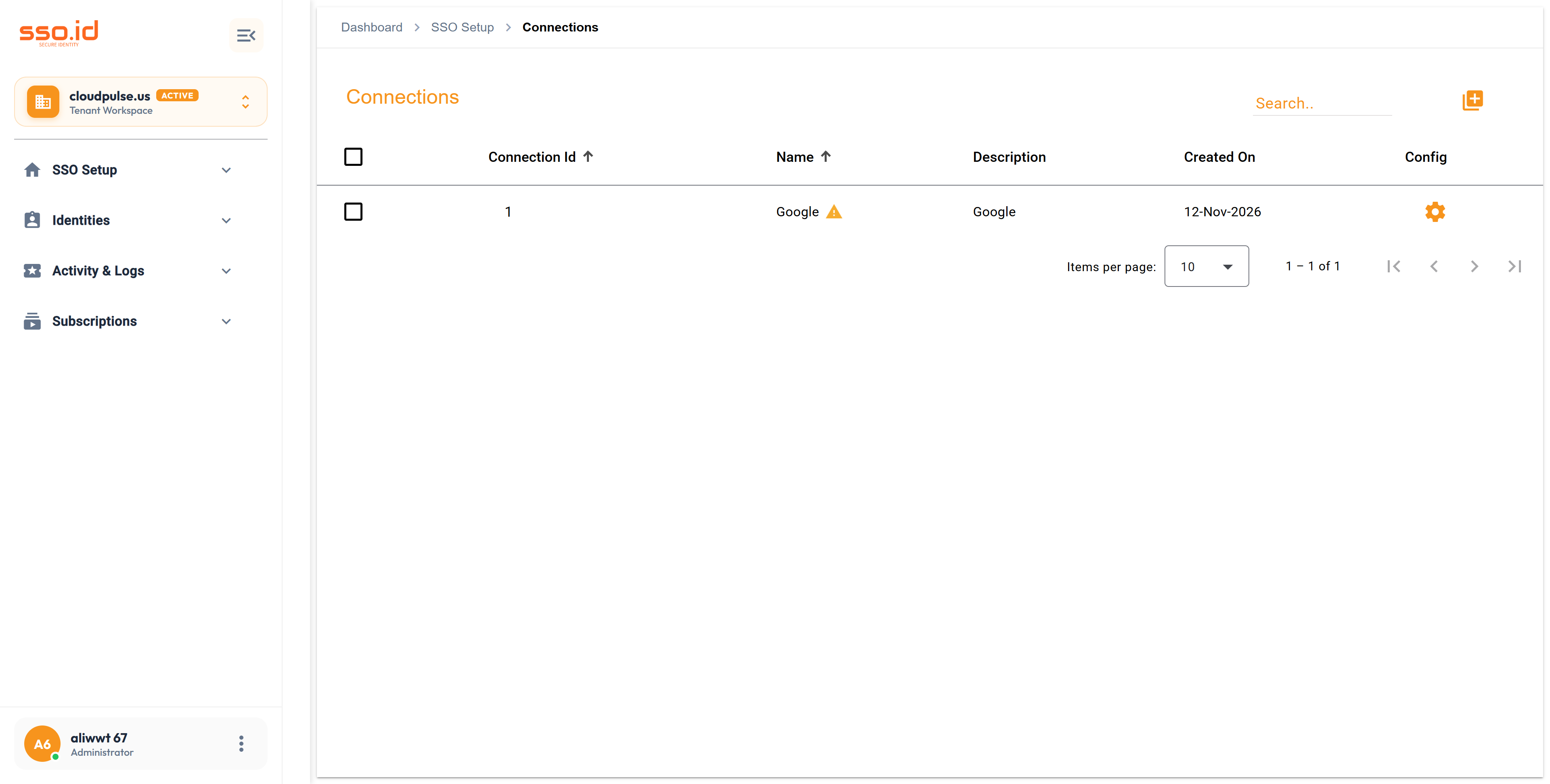
https://cloudpulse.us.beta.sso.id/connections Click to zoom
Identity Connections console at /connections showing configured social and enterprise IdP connections.
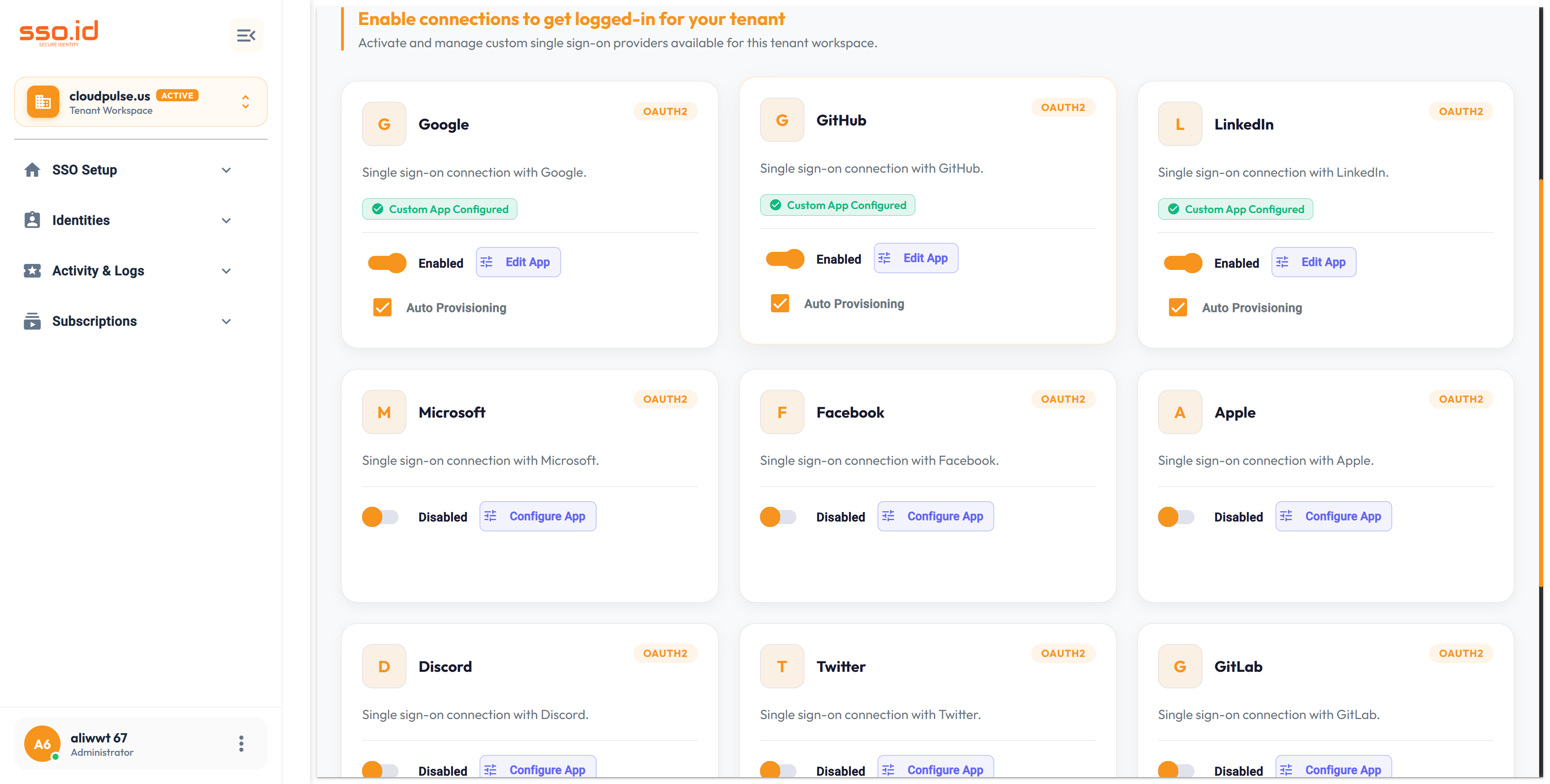
https://cloudpulse.us.beta.sso.id/settings Click to zoom
Tenant Settings — Social & Enterprise Connection toggles (Google, GitHub, LinkedIn, Microsoft, Apple, etc.).

2. Pre-Create Live Connection Testing & Health Monitoring

Inside the Connection Setting Dialog ( /connections), SSO.ID v2 provides two built-in diagnostic workflows:

1

Test Connection Before Saving (POST /api/connections/test & /testConnection)

Click Test Connection inside the creation modal. SSO.ID opens a secure sandbox popup that executes the full OAuth 2.0, OIDC, or SAML 2.0 handshake against the external provider and returns the verified user profile & raw claim payload to the dialog via window.postMessage. Only after the handshake succeeds do you click Save.

2

Continuous Connection Health Check (GET /api/connections/{id}/health)

For saved connections, click the Health Check action to verify that the external IdP's Discovery URL, JWKS endpoint, and SAML X.509 signing certificates are reachable and not approaching expiration.

3. Just-In-Time (JIT) Provisioning, Attribute & Group/Role Mappings

In the Mappings & Provisioning tabs of the Connection dialog, you control exactly how external identities translate into SSO.ID users:

  • Auto-Provision Users (autoProvisionUsers): Automatically creates a user in SSO.ID on first federated login and updates their profile attributes on subsequent logins.
  • Attribute Mapping Table: Map external IdP claims (e.g., http://schemas.xmlsoap.org/ws/2005/05/identity/claims/emailaddress or preferred_username) to SSO.ID fields (email, firstName, lastName, phoneNumber, department).
  • External Group → SSO.ID Role / Group Mapping: Map external directory groups (e.g., Azure AD Object ID or Okta group Engineering-Leads) directly to SSO.ID Roles and Groups so federated users receive immediate RBAC permissions.

4. SCIM 2.0 Automated Lifecycle Provisioning

Open the Provisioning (SCIM 2.0) tab on any Connection (or globally in /settings) to enable automated user and group synchronization with Okta, Microsoft Entra ID, Rippling, JumpCloud, or Workday:

Connection-Scoped SCIM 2.0 Endpoint

https://{your-tenant}.sso.id/api/scim/v2/connections/{connectionId}

Supports inbound, outbound, or bidirectional sync directions for /Users and /Groups using a dedicated SCIM Bearer Token.

Automated Offboarding (Deprovision Action)

Configure what happens the instant an employee is deactivated in HR/Okta (PATCH /Users/{id} active=false or DELETE /Users/{id}):

  • suspend — Locks account and revokes active tokens while preserving audit history.
  • revoke — Revokes all active sessions and group/role assignments.
  • delete — Permanently removes the user record.

5. Scoping Connections to Specific Organizations or Organization Units

Not every connection should appear as a global button on every login screen. SSO.ID v2 gives you two crucial scoping flags in the Connection dialog:

  • Assign to Organization Only (assignToOrganizationOnly): Hides this IdP from the public login screen and activates it only when an application initiates login for that specific B2B customer Organization (?organizationId={organizationId}).
  • Assign to Organization Unit Only (assignToOrganizationUnitOnly): Scopes the connection exclusively to a specific sub-department (?organizationUnitId={organizationUnitId}).

6. Connections & SCIM 2.0 API Reference

Method Endpoint Description
GET / POST https://{your-tenant}.sso.id/api/connections Lists or creates OAuth 2.0, OIDC, or SAML 2.0 connections.
GET https://{your-tenant}.sso.id/api/connections/defaults Returns pre-populated provider templates (Google, GitHub, Microsoft, Apple, LinkedIn, Okta, etc.).
POST https://{your-tenant}.sso.id/api/connections/test Executes a live pre-save handshake test against the target IdP.
GET https://{your-tenant}.sso.id/api/connections/{id}/health Verifies live health, metadata reachability, and certificate validity of a connection.
GET https://{your-tenant}.sso.id/api/connections/sp-metadata Downloads SSO.ID's SAML 2.0 Service Provider Metadata XML (GET /api/connections/sp-certificate downloads X.509 cert).
GET / POST / PATCH https://{your-tenant}.sso.id/api/scim/v2/connections/{connectionId}/Users SCIM 2.0 User provisioning endpoint scoped to a specific connection (also supports /Groups).
AI Agent Prompt Direct Connection Routing (connectionId) & B2B IdP Discovery
You are an identity integration architect. Implement **Home Realm Discovery (HRD) and Direct Connection Routing** in our login flow using **SSO.ID v2**.

### How Direct Connection Routing Works in SSO.ID v2
When redirecting a user to `GET https://{your-tenant}.sso.id/auth/oauth/authorize`, we can pass:
- `connectionId=`: Immediately redirects the user to that external OAuth2/OIDC/SAML Identity Provider (e.g., Google, GitHub, or a customer's Okta SAML IdP) without showing the intermediate SSO.ID login chooser.
- `organizationId=`: Scopes the login screen to that B2B customer's assigned connections and custom branding.
- `login_hint=`: Pre-fills the user's email address or triggers email-domain-based IdP routing.

Please implement an "Enterprise Single Sign-On" email input on our app's login page that checks the user's email domain, resolves their `organizationId` or `connectionId`, and initiates PKCE authorization with `https://{your-tenant}.sso.id/auth/oauth/authorize`.