Documentation base URLs use placeholder https://{your-tenant}.sso.id. Log in to show your tenant or custom domain.
Log in for Your Tenant URL
Chapter 8C — Admin Console Least-Privilege RBAC

Tenant Roles & Console Menu Permissions

Not every administrator in your company should have permission to delete Applications or rotate Signing Keys. Use Tenant Roles ( /tenant-roles) to define fine-grained view / add / update / delete permissions over the SSO.ID v2 Admin Console itself.

Security Governance Story: Giving Tier-1 Helpdesk Password Reset Access Without Touching SAML or Keys

How CloudPulse Created "Helpdesk Support" and "Read-Only SOC 2 Auditor" Console Roles

CloudPulse's IT Support team needed to invite users, resend onboarding emails, and revoke stuck sessions in /user-management, while their external SOC 2 auditor needed read-only access to /audit-logs and /settings. Neither group should ever be able to modify /applications or /connections.

In /tenant-roles, CloudPulse created two custom Tenant Roles:
• Tier-1 Helpdesk: View + Add + Update on User Management and Groups; hidden from all other Admin Console menus.
• External Compliance Auditor: View-Only on Audit Logs, User Activity, and Tenant Settings.
1. Application Roles vs. Tenant Roles

Application Roles (/role-management)

Governs what end users can do inside your integrated SaaS applications (your custom App Pages & Application APIs).

Tenant Roles (/tenant-roles)

Governs what Tenant Members can see and modify inside the SSO.ID v2 Admin Console (https://{your-tenant}.sso.id).

Flow Diagram Admin Console Permission Evaluation Flow
flowchart TD M["Admin Logs in to Console (/{your-tenant}.sso.id)"] --> CHECK["Resolve Member's Assigned Tenant Role"] CHECK --> P1["Admin Role -> Access to /settings, /applications, /billing"] CHECK --> P2["Auditor Role -> View-only access to /audit-logs & /compliance"] CHECK --> P3["Support Role -> Access to /user-management & session revocation"] P1 --> UI["Render Dynamic Admin Sidebar"] P2 --> UI P3 --> UI
Tenant Roles define which sidebar modules and management actions an administrator can view or execute within the SSO.ID v2 Admin Console.
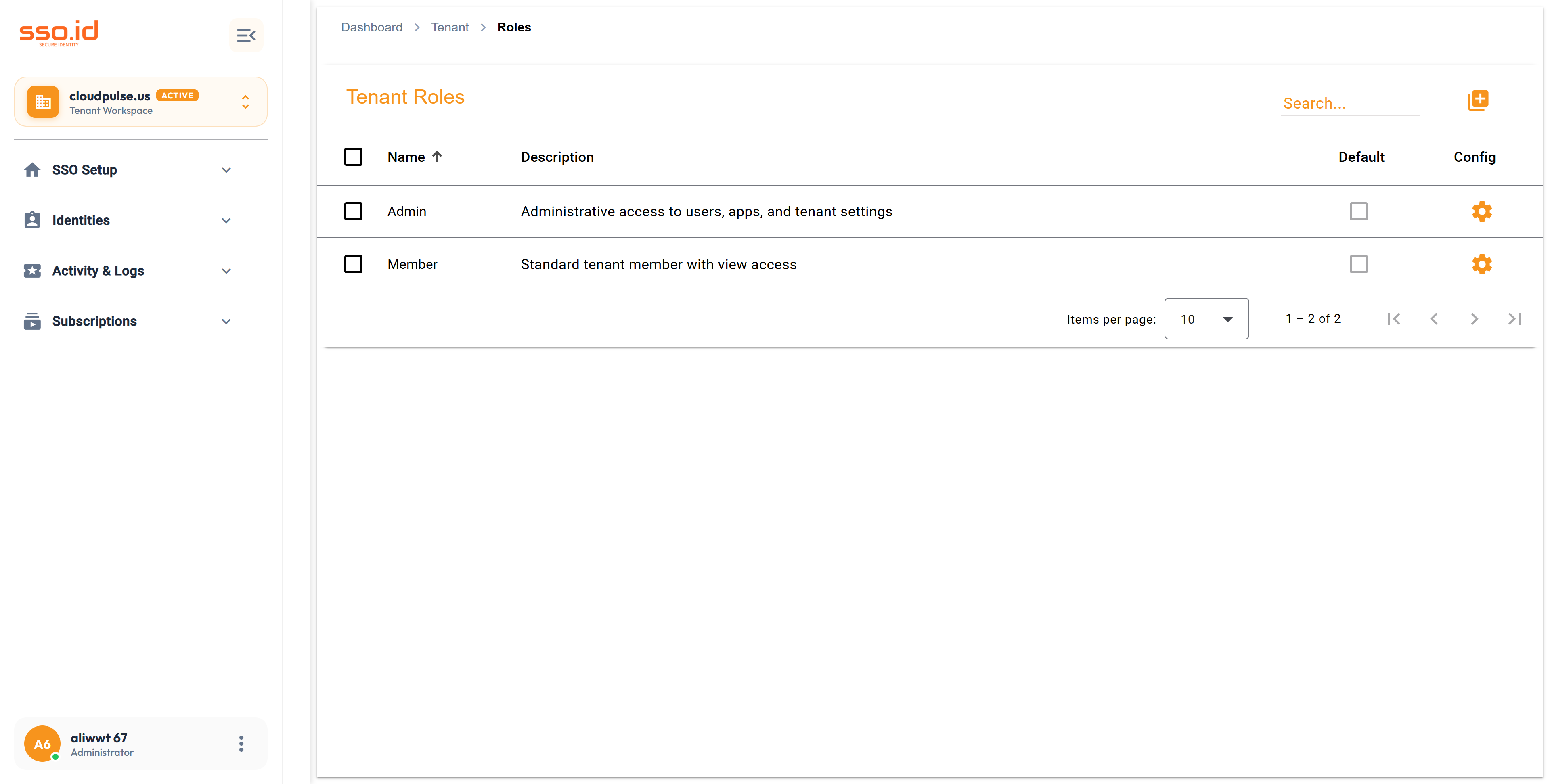
https://cloudpulse.us.beta.sso.id/tenant-roles Click to zoom
Tenant Roles console at /tenant-roles showing Admin and Member administrative console roles.

2. Step-by-Step: Configuring a Tenant Role in /tenant-roles

1

Create the Tenant Role (POST /api/tenants/{tenantId}/roles)

Navigate to /tenant-roles and click Add Tenant Role. Enter the Role Name (e.g., Security Auditor) and Description.

2

Configure Admin Console Menu Permissions (PUT .../roles/{roleId}/menus)

Open the Tenant Role settings dialog to check or uncheck View, Add, Update, and Delete permissions for each Admin Console module (Applications, Connections, Users, Roles, Groups, Organizations, MFA, Settings, Audit Logs). When a Tenant Member signs in, the Admin Console sidebar calls GET /api/tenants/{tenantId}/roles/user-menus and dynamically renders only their authorized console sections.

3

Assign Tenant Members (POST .../roles/{roleId}/users)

Switch to the Assigned Members tab to attach one or more Tenant Members to this role.

3. Tenant Role REST API Reference & AI Prompt

Method Endpoint Description
GET / POST https://{your-tenant}.sso.id/api/tenants/{tenantId}/roles Lists all administrative Tenant Roles or creates a new Tenant Role (PUT / DELETE .../roles/{roleId}).
GET https://{your-tenant}.sso.id/api/tenants/{tenantId}/roles/user-menus Returns the authenticated Tenant Member's permitted Admin Console sidebar menus and CRUD flags.
GET / PUT https://{your-tenant}.sso.id/api/tenants/{tenantId}/roles/{roleId}/menus Gets or updates the Admin Console menu permission matrix for a Tenant Role.
GET / POST / DELETE https://{your-tenant}.sso.id/api/tenants/{tenantId}/roles/{roleId}/users Lists, assigns, or removes (DELETE .../users/{userId}) Tenant Members for a Tenant Role.
AI Agent Prompt Provision Least-Privilege Helpdesk & Auditor Tenant Roles via API
You are a security governance engineer. Write a provisioning script targeting **SSO.ID v2** (`https://{your-tenant}.sso.id/api/tenants/{tenantId}/roles`) that creates standardized least-privilege **Tenant Roles** for our workspace:
1. Create a `SOC2 Read-Only Auditor` role via `POST /api/tenants/{tenantId}/roles` and configure `PUT /api/tenants/{tenantId}/roles/{roleId}/menus` with `view: true, add: false, update: false, delete: false` on Audit Logs, User Activity, and Tenant Settings.
2. Create a `Tier-1 Identity Helpdesk` role with `view: true, add: true, update: true, delete: false` on User Management and Groups.