Documentation base URLs use placeholder https://{your-tenant}.sso.id. Log in to show your tenant or custom domain.
Log in for Your Tenant URL
Chapter 8B — Administrative Workspace Delegation

Tenant Members & Co-Admin Invitations

Collaborate securely across DevSecOps, IT Helpdesk, and Compliance teams by adding Tenant Members ( /tenant-members) to your workspace and assigning them least-privilege Tenant Roles.

Governance Story: Eliminating Shared Root Admin Credentials

How CloudPulse Delegated Console Access to 6 Engineers Without Sharing the Owner Account

Initially, CloudPulse's CTO created the Tenant workspace and shared a single admin login with two DevOps engineers. To pass their SOC 2 Type II audit, every human administrator needed an individual, traceable identity inside the SSO.ID Admin Console with individual actions recorded in Audit Logs.

Using /tenant-members (POST /api/tenants/{tenantId}/members/invite), the CTO invited the DevOps engineers, Helpdesk leads, and external SOC 2 auditor as Tenant Members — each scoped to their own Tenant Role.
1. Directory Users vs. Tenant Administrative Members

Directory Users (/user-management)

End users, customers, and employees who authenticate into your integrated Applications and see the End-User App Launcher Portal.

Tenant Members (/tenant-members)

Platform administrators, security engineers, and support staff who are authorized to switch into the SSO.ID v2 Admin Console for this Tenant and manage its configuration according to their assigned Tenant Role.

Flow Diagram Tenant Administrator Onboarding & Delegation Flow
flowchart LR OWNER["Tenant Owner (/tenant-members)"] --> INV["Invite via Email or Promote Existing User"] INV --> ROLE{"Assign Tenant Role"} ROLE -->|"Admin Role"| FULL["Full Tenant Settings, Billing & Security Access"] ROLE -->|"Member Role"| SCOPED["Scoped Read-Only / Operations Console Access"] FULL --> AUD["Audited in /audit-logs with SHA-256 Hash"] SCOPED --> AUD
Tenant Owners invite co-administrators or promote existing directory users into Tenant Members, binding them to specific console management roles.
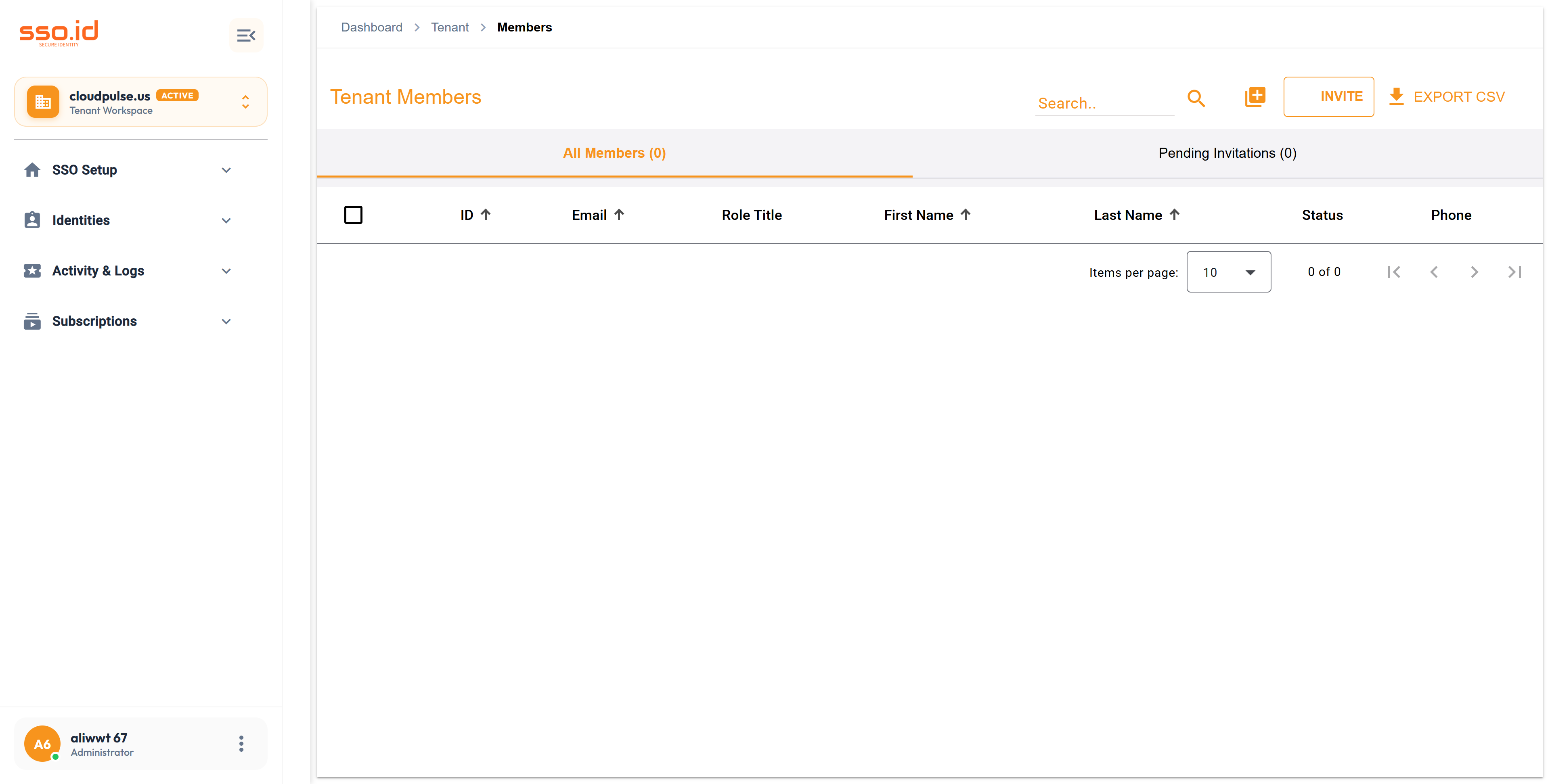
https://cloudpulse.us.beta.sso.id/tenant-members Click to zoom
Tenant Members console at /tenant-members for inviting co-administrators and managing console roles.

2. Three Ways to Add a Tenant Member in /tenant-members

1

Invite by Email (POST /api/tenants/{tenantId}/members/invite)

Send an administrative invitation link to a colleague's email address with a pre-assigned Tenant Role. You can resend pending invitations anytime via POST /api/tenants/{tenantId}/members/{userId}/resend-invite.

2

Promote an Existing User (POST /api/tenants/{tenantId}/members/existing)

Select an existing account already registered in SSO.ID and grant them administrative membership in your Tenant workspace.

3

Create Member Directly (POST /api/tenants/{tenantId}/members)

Provision a new administrative member account directly and assign their Tenant Role (PUT /api/tenants/{tenantId}/members/{userId}). Revoke console access anytime via DELETE /api/tenants/{tenantId}/members/{userId}.

3. Tenant Member REST API Reference & AI Prompt

Method Endpoint Description
GET / POST https://{your-tenant}.sso.id/api/tenants/{tenantId}/members Lists all administrative members of the tenant or creates a new member.
POST https://{your-tenant}.sso.id/api/tenants/{tenantId}/members/existing Adds an existing SSO.ID user as an administrative member of the tenant.
POST https://{your-tenant}.sso.id/api/tenants/{tenantId}/members/invite Dispatches a Tenant Member email invitation (POST .../{userId}/resend-invite resends).
GET / PUT / DELETE https://{your-tenant}.sso.id/api/tenants/{tenantId}/members/{userId} Retrieves, updates, or revokes a Tenant Member's console membership.
AI Agent Prompt Automate DevSecOps Team Onboarding into Tenant Workspaces
You are a platform security engineer. Write an administrative script targeting **SSO.ID v2** (`https://{your-tenant}.sso.id/api`) that onboards a list of DevSecOps engineers as **Tenant Members** across our Staging and Production tenants:
1. Call `GET https://{your-tenant}.sso.id/api/tenants/{tenantId}/roles` to look up the `Security Engineer` Tenant Role ID.
2. For each engineer email, call `POST https://{your-tenant}.sso.id/api/tenants/{tenantId}/members/invite` with their profile details and assign them to the `Security Engineer` role via `POST https://{your-tenant}.sso.id/api/tenants/{tenantId}/roles/{roleId}/users`.