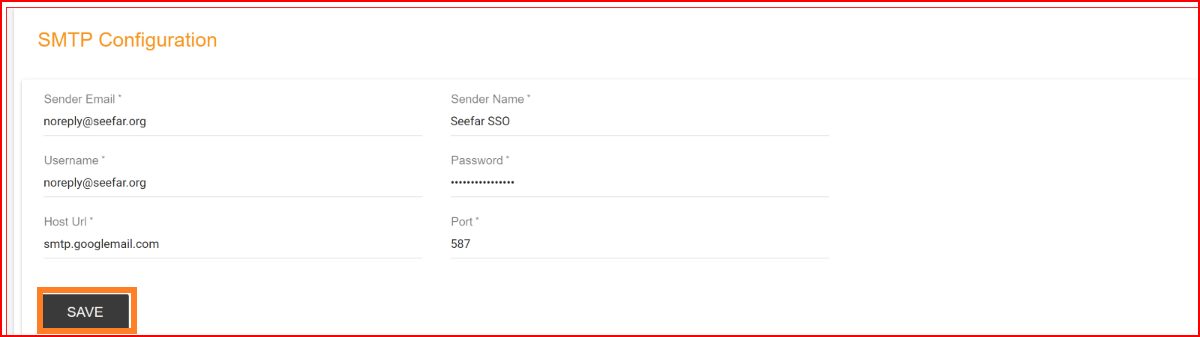
SMTP Email Configuration in SSO.ID v2
In SSO.ID v2, SMTP configuration enables automated email delivery for user verification OTPs, password reset links, magic link sign-ins, and security notifications. Manage SMTP settings in the Angular Console at https://app.sso.id/admin/smtp or via Core REST APIs (https://api.sso.id/api/smtp).
- Sender email: In SMTP configuration, the "sender email" refers to the email address that is used as the "From" address when sending emails through the SMTP server. This sender's email address is where recipients will see that the email originated from. It is essential to specify a sender email address that is valid and representative of the source of the email.
- Sender Name: In SMTP (Simple Mail Transfer Protocol) configuration, the "Sender Name" is the name associated with the email address specified as the sender or "From" address when sending emails. It is the human-readable part of the sender's identity that appears alongside the email address in the recipient's inbox.
- SMTP Username and Password: These are the credentials used for authenticating the SMTP server when sending emails from the SSO.ID system.
- Host URL: In SMTP (Simple Mail Transfer Protocol) configuration, the "Host URL" typically refers to the server's address or hostname that you use to connect to the SMTP server for sending email messages. This address is crucial for establishing a connection between your application or email client and the SMTP server. Here's what you need to know about the Host URL in SMTP configuration.
- Port: SMTP uses specific port numbers for communication. The two most common ports are 25 (unencrypted) and 587 (encrypted with TLS/SSL). The choice of port depends on your email provider and security requirements.